Wednesday, 9 March 2022

Notices to Competitors

In that mythical ideal world there is no requirement for communication between race management and competitors until the warning signal. Everything is in the Notice of Race and the Sailing Instructions. What more is needed? What could possibly go wrong?

The answer is of course, as we all know, lots of things from typos in the SIs, to Racing Abandoned due to unforeseen circumstances, to bar open all day. There is always a need for an open line of communication between race officers and racers.

The traditional way is sheets of paper on the notice board and flags flying from the club flagstaff. Quaint but not much use when the competitor is still at home having his breakfast. And he’s not going to be best pleased when he drives all the way to the club only to find N over A flying.

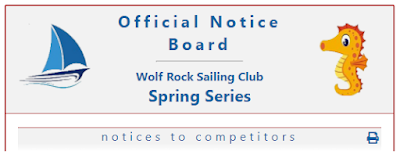
SailEvent virtual notice boards have the solution. Type in your notice to competitors, it appears on the board and everyone on the entry list is notified by email or text. Notices are automatically numbered and time stamped.
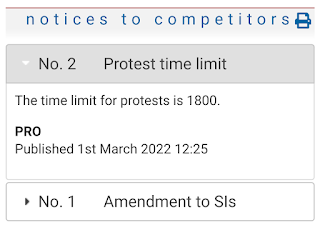


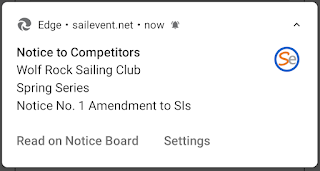
What’s more, those who have enabled notifications are pinged on their phones. 


So there you have it, SailEvent virtual notice boards offer a simple technical solution that makes the RO’s life easier and provides a better experience for competitors. Your communication channels are open.

Monday, 14 February 2022

Notice boards - they're about communication

The purpose of notice boards, whether real or virtual, is to convey information from race management to competitors.

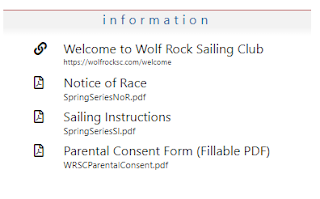
Documents are the bedrock of this information. The Notice of Race and the Sailing Instructions are the big players but there are others such as safety information, parking arrangements, bar opening times.

And in our electronic era, much information may well already be on the web, perhaps on your club website, so there is no need to actually ‘pin’ a notice to the board – just provide a link to it.

On SailEvent virtual notice boards, documents are PDF files uploaded from your computer. There are many ways to create PDFs such as saving word processor documents in that format or printing to PDF. The big advantage of PDFs is that they are not easily modified by the reader.

Links on virtual notice boards are simply URLs of web pages or other files on the web. An easy way to get them on a board is to open the page or file in your browser, copy its URL from the address bar and paste it into SailEvent. Notice board links always open in a new browser tab.

You can also compile a library of frequently used documents and links then just pull them from the library onto the notice board. You can even say that some items in the library – perhaps those safety instructions, car parking arrangements, bar opening times – must appear on every notice board.

So apart from the obvious, what else might you put on a board? Here are some ideas –

  • Forms – parental consent, menu choices, results queries.
  • A Welcome video.
  • An invitation to join the event’s WhatsApp group.
  • A link to your club’s or the event’s online shop.
  • Links to class associations.

In short, it’s about communication - if you want to tell the competitors, put it on the board.

Build your list of documents and links at >Notice Boards. Your library is at >Admin >Docs & Links Library.


Wednesday, 26 January 2022

Add some colour

SailEvent Themes let you add colour and images to your virtual notice boards.

There are three colours in each theme and up to two images. Here’s a less than subtle example but it does serve to illustrate the components of a theme.

Red is the border colour, blue is the text colour and grey is the background colour. This example has two images, left and right, but you can omit either one or both.

Every SailEvent account comes with a Default theme which is applied to new notice boards. Out of the box the default theme is simply black and white with no images but you can modify yours to, for instance, reflect your club’s colours and add a burgee. You can also create your own themes for specific events or series. Maybe include a sponsor’s logo or a class insignia.

Theme colours can also be applied to SailEvent entry forms. Most likely you’ll want the same theme for both notice board and entry form but they can be different.

Themes are maintained at >Admin >Themes and are applied to notice boards on the Notice board page and to entry forms on the Competitions page. Go ahead and be creative but, please, not too garish!


Monday, 17 January 2022

Introducing SailEvent Virtual Notice Boards

Happy New Year, everyone. We usher in a better, brighter 2022 with SailEvent Virtual Notice Boards

Notice boards are the go-to place on the web where competitors gather to find out what’s going on. Their immediacy presents a familiar and expected route to on-the-water participation for today’s phone-savvy sailors.

And now with SailEvent, anyone can build a feature-rich online notice board in minutes. Then enhance and adapt it as your event evolves.
 
There’s a lot happening on the boards -
  • Documents like the Notice of Race and Sailing Instructions.
  • Forms to collect the competitor information you need.
  • Links to elsewhere on the web. Perhaps you have a Welcome Video or you want to invite people to a WhatsApp group.
  • Notices to Competitors (and the competitors get notified automatically!)
  • Action Buttons to open entry forms, entry lists, results.
  • All customisable, adaptable and easily updatable.

There’s also nifty technical stuff like install-as-an-app and push notifications.

In the next blog posts we’ll talk in depth about different aspects of notice boards but meanwhile why not dive in and take a look around. Every board is linked to a competition – series, championship, meeting, regatta, whatever – so make sure you have one ready. Then choose Notice Boards from the menu, add a new one, point it at its competition and start building.

Our spoof Christmas Cracker event at https://SailEvent.net/noticeboard/r1 shows what can be done. Please don’t take it seriously!

Tuesday, 7 December 2021

‘Tis the Season to be Jolly

And here’s your invitation to participate in a jolly Christmas event organised by the North Pole Yacht Club. The Official Notice Board and entry form are at https://sailevent.net/noticeboard/r1

Not only is this a bit of festive fun and silliness it’s also an opportunity to showcase the new SailEvent Virtual Notice Board.

The advantages of notice boards on-line are pretty clear – available, adaptable, interactive, all the good things you expect from the web - and clubs and classes are beginning to construct them on their own sites. Now SailEvent provides a no-code solution that lets you quickly and easily design and create your own virtual notice board that’s just right for sailors. And there's no need to trouble your webmaster!

What’s on the board:

Documents such as Notice of Race, Sailing Instructions and your own forms.

Links to useful information on the web – directions to the venue, Racing Rules of Sailing, invitations to join WhatsApp groups – the opportunities are boundless.

Notices to Competitors that are automatically published to entrants by text, email or push notification.

Hot links to the entry form and results page.

Customisable look and feel – create your own colour schemes and add images.

And that’s only version 1; there’s more to come. The boards will be available in the New Year but please do take look at this seasonal preview now and send us your comments and feedback. And enter the event – Santa needs you!


Wednesday, 13 October 2021

HalSail Import plus Class List Auto Add

Here’s a goodie for all you HalSail users – you can now import boats directly from a HalSail series into a SailEvent competition. That means you no longer need to download a file from one system and upload it into the other.

This is how it works

If you haven’t already done so, set up HalSail integration so it can communicate with SailEvent. (5 mins)

Link your SailEvent competition to its equivalent HalSail series. (30 secs)

In your SailEvent competition, on its More tab, press the Import button and that’s it – your HalSail boats are now SailEvent competitors. (10 secs)

If you make changes in HalSail just import again and everything is in synch.

What’s more, with the new class list Auto Add feature, you don’t need to list all your classes in SailEvent before importing. Just create an empty class list, set it to Auto add and, at import time, it is populated with your HalSail boat types. 

And naturally class list Auto Add also works with any set of competitors that you upload from an external source.

So that’s two more ways that SailEvent speeds and improves your sailing event management.


Sunday, 3 October 2021

Expired SSL Certificates

Disclaimer: The SailEvent team knows precious little about Secure Socket Layers, encryption, Certificate Authorities and all that good stuff. To us SSL certificates are just gizmos that work to make the web a better place.

Except occasionally they don’t work as some SailEvent users have recently discovered. When they go to SailEvent, their browser tells them that the site is insecure because its SSL certificate has expired.

But it’s not actually SailEvent’s certificate that has expired. That’s valid until 31/12/2021 when it will automatically renew. The certificate that expired on 30th September is the one at the top of a chain and the one that says “all the certificates below me in the chain can be trusted”.

SailEvent’s certificate is issued by Let’s Encrypt. Let’s Encrypt is a non-profit certificate authority and the world’s largest, providing certificates to over 265 million websites so we are in good company. In fact there are reports that users of the likes of Slack, Shopify and Fortinet among others have hit the same problem.

Of course Let’s Encrypt knew this certificate was going to expire so provided a new one that will be good for many years. Trouble is, instructions as to which chain to follow to reach the top-level certificate are hardcoded into software on people’s phones, tablets and computers. Updated instructions have been distributed for quite a while but people running on older software will still be following the old chain leading to the certificate which expired on Thursday.

At least that’s our understanding. There are more erudite explanations here:

https://letsencrypt.org/docs/dst-root-ca-x3-expiration-september-2021/

https://scotthelme.co.uk/lets-encrypt-old-root-expiration/

So what to do? Unfortunately there are no practical steps, no setup changes, no software updates, that we can make. But we can offer this advice to anyone who is affected by this issue:

Make sure you are running the most up to date version of the operating system and web browser that you can on your device. That’s always sound advice.

If that doesn’t fix it, try a different browser. There’s a suggestion that Firefox is a good one.

If all else fails you can still go to SailEvent by ignoring the warning but be aware that your connection will not be encrypted.

Please accept our apologies if you have been troubled by this unfortunate circumstance but do understand that it is not of our making. It may be that the situation will improve over time; if we hear anything we’ll let you know.